How can we help you?
Create and manage the financial accounts used by your sports organization. You can set up cash accounts for internal operations or bank accounts for official transactions such as payments, memberships, and sponsorships.
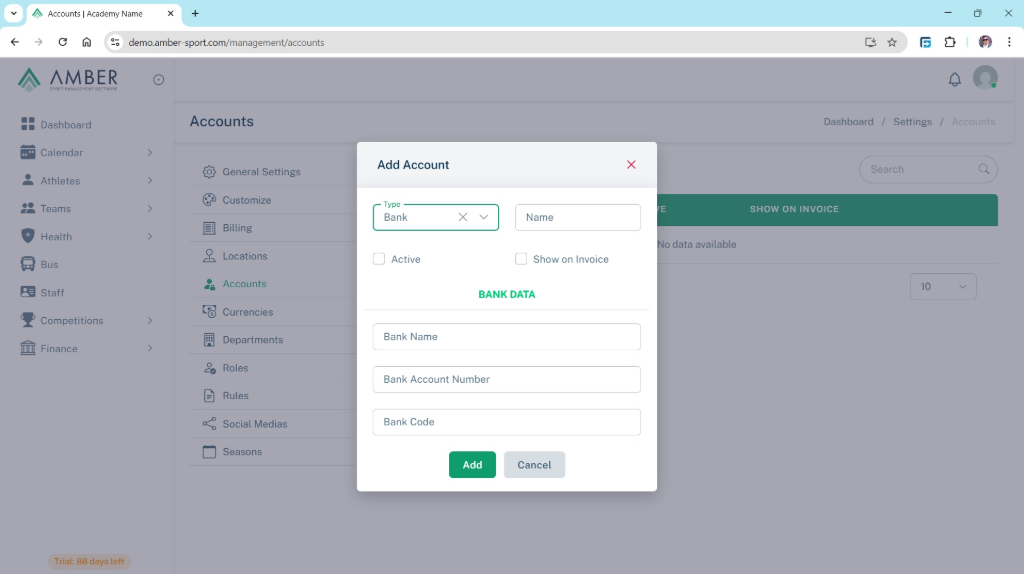
Instructions:
Go to Dashboard > Settings > Accounts.
Click Add New Account.
Fill in the fields according to the account type:
For Cash Accounts:
Account Name: Enter the name of the cash register (e.g., Cash Euro, Cash USD).
For Bank Accounts:
Account Name: Give a clear name to identify the account (e.g., Raiffeisen Bank EUR, Deutsche Bank USD).
Bank Account Number: Write the official account number or IBAN.
Bank Code: Add your bank’s code (e.g., SWIFT or Branch Code).
Tips
Register accounts with the currency in their name (e.g., Raiffeisen Bank EUR) to easily distinguish them later.
Activate or deactivate accounts:
Accounts can be active or inactive.
If an account is no longer used, you can deactivate it to avoid mistakes.
You can also select which account will appear on invoices, so parents know which account to use when making payments.
Click Save to complete the setup.
Example:
Bank Account Example:
Account Name: Raiffeisen Bank EUR
Bank Account Number: AL47212110090000000001234567
Bank Code: SGSBALTX
Status: Active
Used on invoices: Yes
Cash Account Example:
Account Name: Cash USD
Status: Active
Used on invoices: No
Tips
Keep cash and bank accounts separate for better financial tracking.
Always verify your bank details before saving.
Accurate account setup ensures clear reporting, easier payments, and transparent financial management across your organization.
Need Assistance? We're Here to Help!
Have questions or need support? Submit a ticket, and our team will get back to you quickly with the solutions you need.
