How can we help you?
First-time Dashboard Overview
Your Dashboard is the first page you see after logging into Amber Sport. It provides a quick overview of your organization, teams, athletes, trainings, competitions, and other key data.
Welcome Message
Personalized greeting: Good evening, Dritan!
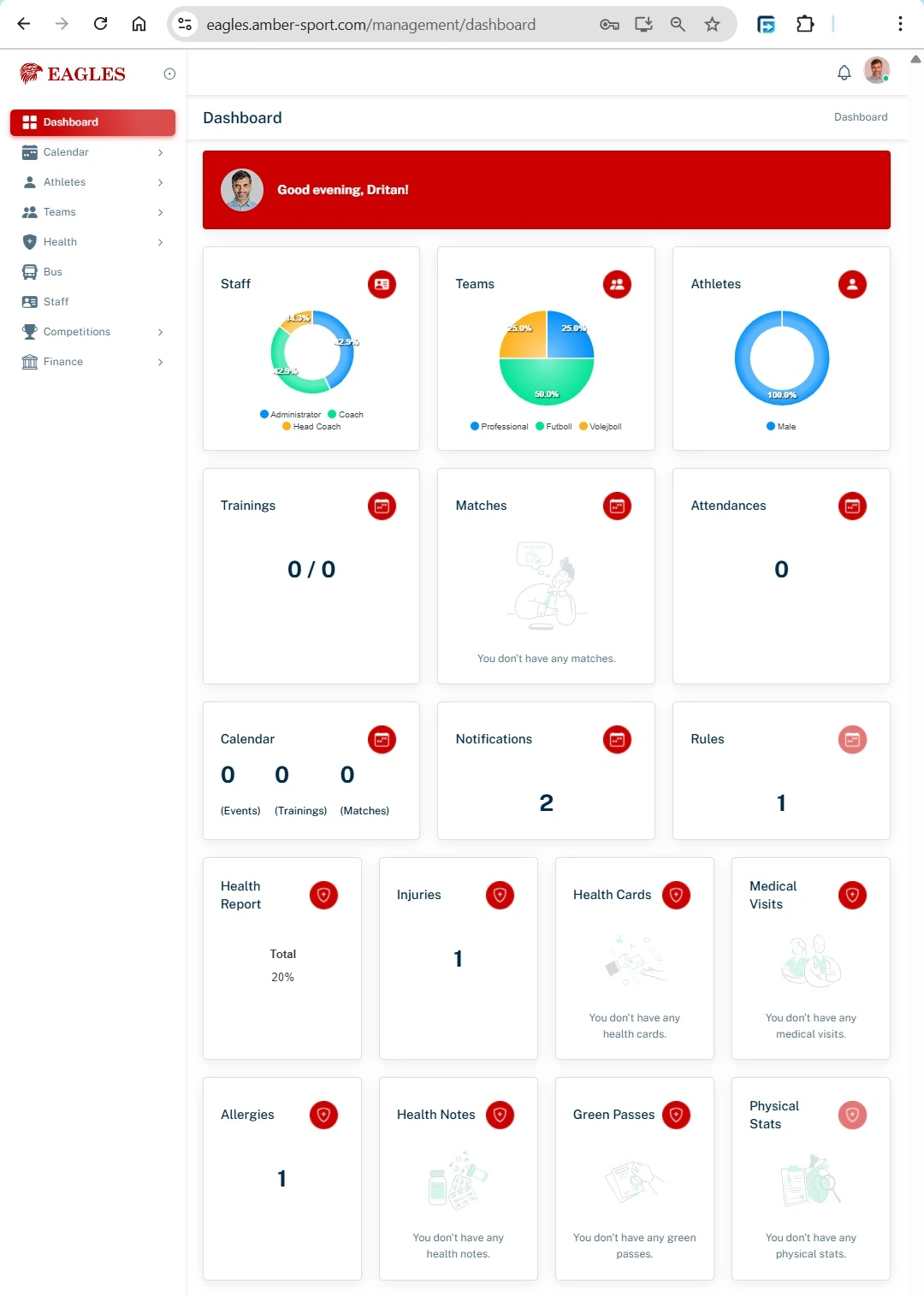
Main Menu
The left-hand menu gives access to the main sections:
- Dashboard Quick overview of key stats and recent activity.
- Calendar View upcoming events, trainings, and matches.
- Athletes Manage athlete profiles, health info, and attendance.
- Teams Organize athletes into teams and manage team details.
- Health Track injuries, medical visits, allergies, and physical stats.
- Bus Manage transportation schedules (if applicable).
- Staff Manage coaches and administrative staff roles.
- Competitions Create and manage competitions and matches.
- Finance Track payments, subscriptions, and invoices.
Dashboard Widgets / Cards
The Dashboard is organized into widgets to show important information at a glance:
Trainings Number of trainings completed / total scheduled (e.g., 3 / 32)
Matches Number of matches played / total scheduled (e.g., 1 / 2)
Attendances Number of recorded attendances (e.g., 0)
Calendar Number of upcoming events, trainings, and matches (e.g., 0 / 32 / 2)
Notifications Alerts and reminders (e.g., 3)
Rules Organizational rules assigned (e.g., 0)
Health Reports Quick summary of athlete health, including injuries, medical visits, allergies, green passes, physical stats, etc.
Health Section Details
- Injuries: Number of active injuries (e.g., 1)
- Health Cards: Athlete health cards (e.g., 1)
- Medical Visits: Records of medical visits (e.g., 1)
- Allergies: Track athlete allergies (e.g., 1)
- Health Notes: Notes from medical staff (e.g., 1)
- Green Passes: Digital health passes, if applicable (e.g., none)
- Physical Stats: Measurements and stats of athletes
Tips
Click on any widget to see detailed information.
Use the left menu to quickly navigate between sections.
Keep the Dashboard updated by recording trainings, matches, and attendances regularly.
Review athlete health info frequently to prevent injuries.
Need Assistance? We're Here to Help!
Have questions or need support? Submit a ticket, and our team will get back to you quickly with the solutions you need.
